|
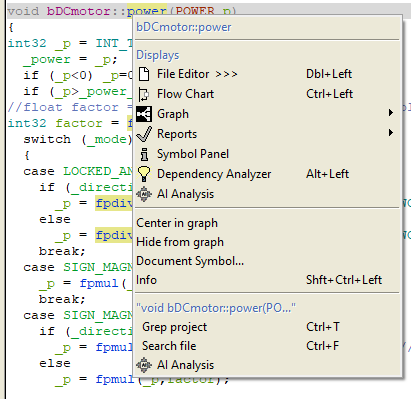
Generating a QueryBy invoking a query through Imagix 4D’s menu system, you select the focus of your interest. The query’s content is then automatically generated, as Imagix 4D packages together relevant data collected from its database together with any source code specific data related to your point of focus. This results in context-specific queries.Context-Aware Entry Points (Popup Menus)
This menu action builds a context-specific query based on the target and the specific view you are interacting with: Symbols & Editor Selections - Right-clicking any function, class, variable, or macro in any of Imagix 4D's displays generates an overall analysis of that symbol. You can also select specific lines inside a file editor to gain insight on that particular portion of your source code. Visual Diagram Objects - Triggering the AI from inside a Graph Window, Flow Chart, or Data Flow view instructs the system to analyze a textual representation of your active graph. It seamlessly evaluates visual nodes, isolated control paths, data dependencies, and cross-subsystem relationships. Metrics & Source Reports - When analyzing software complexity, you can run queries directly against highlighted rows in Metrics Windows or specific violation blocks in Source Checks (such as MISRA C, AUTOSAR, or CWE compliance audits). For small, individual reports, the AI is able to ingest and analyze the report’s full contents. Search Layouts & Lookups - Queries can be initialized right out of Grep Project search results or structural database queries inside the DB Lookup panel, making it easy to analyze architectural patterns across thousands of disparate files.
Window-Level Analysis (File Menus)In addition to right-click popups, persistent hooks for broad, high-level AI analysis are located under the local File menu of most major Imagix 4D tool windows. This includes the primary Editor, Graphs, Flow Charts, Data Flows, Delta Tools, Metrics, Reports, and Review windows. Analysis of the overall project is available through the File menu in Imagix 4D’s top-level menubar.When executed at these window levels, the AI shifts from examining a single entity to providing an overall quality assessment of the file or view. For example, in an editor window, the AI automatically evaluates global file metrics — such as total lines of code, comment-to-code ratios, density of nested structures, and the absolute count of internal classes, functions, and data types — to identify potential refactoring targets. Context PackagingTo ensure responses are highly accurate and meaningful, Imagix 4D automatically synthesizes background context into the query. For example:Program Symbols - Imagix 4D bundles everything contained within the Symbol Panels's Usage, General Information, and Metrics tabs for that symbol. The AI receives a full map of what calls the function, what the function calls, its cyclomatic complexity, and its structural signature. Metrics & Source Reports - The system automatically injects the overarching report purpose, the exact rule or criteria being checked, and specific metric definitions directly into the query. Follow-On QueriesOnce you have begun the querying process with a given AI system, thereby seeding it some baseline of information about your project, you can then supplement that insight with your own custom questions. You’re able to ask these questions through the File > Ask Any Question… dialog in the AI Analysis window.
|