


AI-Powered Code Analysis
AI-Powered
| Use the power of AI to enhance the information Imagix 4D provides you about your software. Imagix 4D interfaces with advanced artificial intelligence models to help you better understand complex legacy codebases, interpret visual diagrams, and enforce software design best practices. AI Analysis leverages the comprehensive database that Imagix 4D generates about your software, complementing the graph, report, editor and ancillary windows where that data is displayed without interpretation. The tool enhances that information by providing explanations of what you're viewing, by making inferences about the purpose behind that part of your software, and by suggesting source code improvements to consider. Interaction in the AI Analysis tool is done through a query / answer process. You launch an automatically generated query by selecting some portion and aspect of your software that you’re interested in. The AI system then returns an answer providing further insight about the item of interest. By applying AI Analysis to the study of your software, you're able to attain deeper understandings, consider wider ranges of action, and reach more considered conclusions than you would otherwise have achieved. | |
AI-generated inferences about
software targets of interest


AI Inferences
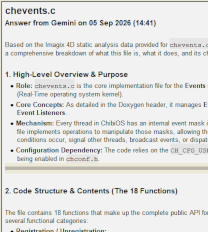
As you target areas of your software for deeper examination via AI Analysis, the AI engine applies models trained for good understanding of programming and software designs. The resulting responses provide insights into your code and its structure.
The AI answers are formatted in typical AI chatbot style, organized in sections. The types of information in the answer as well as their detailed content will depend on the context of the query and the nature of the specific part of your software that you are examining.
Examples of inferences:
- Points out potential defects
- Recommends areas of refactoring opportunities
- Suggests potential performance improvements
- Explores concurrency and security concerns
- Reviews maintainability and readability of code
- Advises further analysis and actions
Analyze Anything
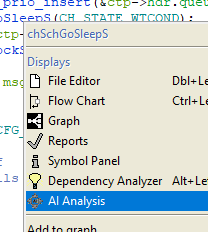
AI Analysis is invoked through Imagix 4D's menu system. As you're studying the information presented in any display, you can click on an item of interest and receive further AI-powered insight. Your target might be a full graph, or a box representing an architectual subsystem, or a symbol listed in a report, or some selected lines of code in a file editor. Wherever your interest lies, you're able to direct the AI Analysis there. And the inferences you receive back extend your understanding and may spur some thoughts about actions to take.
Example targets of analysis:
- Symbols (files, classes, vars, functions, data types, etc)
- Graph symbols, relationships or entire graph
- Selections of sections in reports or code review checks
- Selections of rows in metric
- Selections around symbols in file editor
- Selections of comments and other strings in file editor
- Grep results
Context Assembly
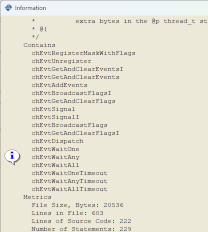
As Imagix 4D loads in your source code, it generates a comprehensive database. The data ranges from your software's high level architecture to its class inheritance to its function dependencies to its data flows to its type usage.
The AI Analysis acts as an automated synthesizer of this data, assembling comprehensive snapshots about your analysis targets and feeding the AI model with highly contextualized queries. As a result, the model is able to produce useful, accurate AI inferences.
Info included in queries:
- Category and scope of symbol
- Directory and file location of symbol
- Usage and dependencies of symbol
- Metrics values of symbol
- Associated comments in source code
- File contents
- Purpose of report
- Check rule in code review
- Software metric names
Custom Queries
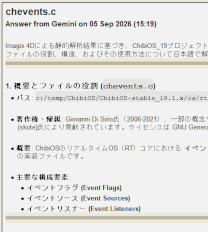
Over the course of your AI Analysis session, the AI model accumulates information about your software from the context-rich queries you initiate through the menu system. You can take advantage of the model's acquired knowledge by initiating your own custom queries through AI Analysis's 'Ask Any Question...' dialog.
Your query can be in the language of your choosing. As can AI Analysis's response, and all of the answers returned through any AI Analysis query.
Custom queries:
- AI models apply natural language understanding to run your custom query against the knowledge base.
- Max length of synthesized queries is selectable. In addition to impact on response time and scope of answer, this effects how quickly AI model's knowledge base is built up.
AI Systems
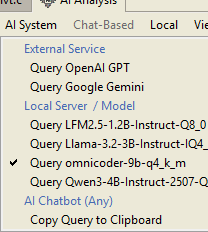
Imagix 4D supports three alternative modes of integrating with an AI engine, so you can pick an alternative that matches your priorities for performance, data security and cost.
External Cloud Services offers seamless high-speed cloud integration using API keys. Local AI Server provides maximum data loss protection via a self-hosted, secure infrastructure typically utilizing dedicated hardware. Interactive Chat-Based is a zero-cost manual approach through a browser-based copy-paste workflow.
External Cloud Services:
- OpenAI GPT
- Google Gemini
- Fully automatic API interaction
- Run in your environment
- Selection of AI models
- Fully automatic API interaction
- Use any desktop chatbot
- Semi-automated interaction
Close