


Static Analysis, Software Metrics & Test
Static
| The quality checks and software metrics produced by Imagix 4D enable you to identify potential problems during the development and testing of your source code. By identifying and correcting the problem areas earlier, you're able to improve the security, reliability, and maintainability of your software. And if you're reviewing open source or third party software, you can judge the code's quality. Static analysis using the comprehensive, highly precise data collected about your source code provides checking and verification of thread safety and semaphore / mutex / interrupt-based concurrency control. For real-time embedded multitasking or multithreaded software, you're able to spot potential conflicts leading to deadlocks and race conditions. You can track and inspect data flow through such complexities as multiple levels of pointer indirection, passing by reference, dynamic memory allocation and type casting. Complementing these specific analyses are source checks that identify exceptions to generally agreed upon design and coding standards. And you can compare the software metrics to specific norms for your organization to track development progress and insure that the software meets your development criteria. Beyond their stand-alone use, these verifications and checks are combined with Imagix 4D's source code analysis and visualization to provide efficient, automated testing of security and reliability standards. Standards checklists are available for the Common Weakness Enumeration (CWE) initiative, the MISRA C, MISRA C++ and AUTOSAR C++ standards, and the HIS + MISRA-C metrics. Having this integrated with the other functionality of Imagix 4D improves the efficiency of both your quality assurance and your program understanding efforts. From the metrics and the quality analysis reports, you can drill down and examine the source code where a problem is occurring. You're able to understand the root causes and review all related dependencies before making changes. | |
Static analysis and software
metrics for C, C++ and Java


Concurrency Tests

In multitasking and multithreading C and C++ systems, thread safety is achieved through the use of mutexes, semaphores and interrupts to control concurrency. Errors in synchronization design or implementation lead to issues such as race conditions and deadlocks, and can be very difficult to spot in large, complex systems.
Imagix 4D's analysis of thread safety ranges from reports mapping intertask data sharing to tests identifying imbalance entering and exiting critical regions via semaphores, etc.
Variable Checks

A series of static analytical verifications of your source code identify potential problems related to the use of variables in your code. Issues such as reading uninitialized variables can have serious impacts if they occur in the run-time execution of your software. Other issues such as unused variables or useless assignments might indicate underlying design or implementation issues.
The Variable Checks reports also provide important insight of the data flow of your software, showing the flow of variable values that go into or result from the calculation of each variable.
Variable checks include:
Data flow tracking identifies:
- Direct Assignments
- Parameter Assignments
- Assignments through Reference Parameter
- Used in Condition
- Used in Expression
- Reference Taken
Source Checks
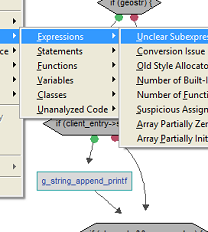
A collection of source level checks point out exceptions to generally agreed upon design and coding practices, including over 50 MISRA C rules.
These quality checks are presented through a series of reports. Each report lists all the exceptions to a particular source check, across all the files in the project. Alternatively, reports are available which list all the exceptions to all of the source checks, for one specific file. Quality check exceptions can also be displayed in the File Editors, pointing out potential problem areas while you are working with the source code itself.
76 source checks include:
- Boolean Type in Switch
- Composite Assign to Wider
- Inappropriate Essential Type
- Init Lacks Braces or Values
- Mismatched Parameter Type
- Missing Default Case
- Missing Static Specifier
- Pointer Cast Mismatch
- Portability Problem
- Qualifier Removed in Cast
- Suspicious For Loop
- Wrap-Around of Constants
Software Metrics

The source metrics generated by Imagix 4D provide insight into many aspects of the quantity, quality, complexity and design of your software. From the level of individual functions up to directories and subsystems.
You're able to measure development progress, determine where to focus testing efforts. You can compare the source metrics to specific norms for your organization to insure that the software meets your development criteria. And by tracking the metrics over time, you can measure process improvement, assessing the effectiveness of process initiatives.
135 metrics include:
- McCabe Cyclomatic Complexity
- Maintainability Index (Welker)
- Chidamber and Kemerer object oriented (6)
- Class Cohesion (Hitz/Mont.)
- Class Coupling
- Stability of Subsystem
- Comment Ratio
- Decision Depth
- Halstead complexity (4)
- Knots (Woodward, etc)
- Statements, Lines, etc.
MISRA and CWE

Safe application of both embedded control systems and standalone software is aided by Imagix 4D's checking against the guidelines of MISRA C (full coverage), MISRA C++ (all except chapter 14), AUTOSAR C++ and HIS+MISRA.
The Common Weakness Enumeration (CWE) standard is used to review software, to improve its security, quality and reliability. Imagix 4D targets CWE rules that are most efficiently tested by static analysis augmented by source code analysis and inspection, to extend testing and to document compliance.
MISRA C++ rule checks include:
Over 200 CWE checks include:
- 5-0-15 Array indexing shall be the only form of pointer arithmetic
- 8-5-1 All variables shall have a defined value before they are used
Over 200 CWE checks include:
- CWE-116 Improper Encoding or Escaping of Output
- CWE-408 Incorrect Behavior Order: Early Amplification
- CWE-909 Missing Initialization of Resource
Close